YouTube is the biggest video sharing platform available and it has tons unsafe and explicit content hosted on the website. Last week it was reported that YouTube is going to releasea kids-friendly version of YouTube to ensure a more age-friendly engagement of kids.
Today, YouTube launched the Android and iOS app YouTube Kids. YouTube called it the “first Google product built from the ground up with little ones in mind.” This kids’ version of YouTube was rumored to be in works since 2014.
Let us take a look at the main features of the YouTube Kids app:
Bright and playful design:
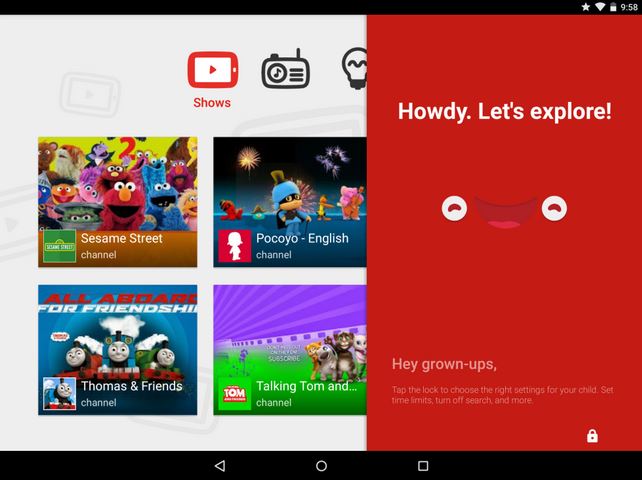
The design of the YouTube Kids app is bright and playful. The images will be larger and icons will be bold which makes it easy for your 4-year-old to navigate with his little thumbs. Also, the app is having a voice search so that if your kid can’t spell or type, he/she still can find videos of his/her requirement.
Family-focused content:
The contents on YouTube Kids Will be appropriate and narrowed down. Family-focused content will be shown so that the parents can relax knowing that his kid is safe with it. You can browse channels and playlists in four categories: Shows, Music, Learning and Explore. Or, you can search videos of particular interest, like tutorials on maths, science etc.
Parental controls:
Parental controls are the highlight of YouTube Kids app and it gives you a better control over your child activity on the YouTube app.
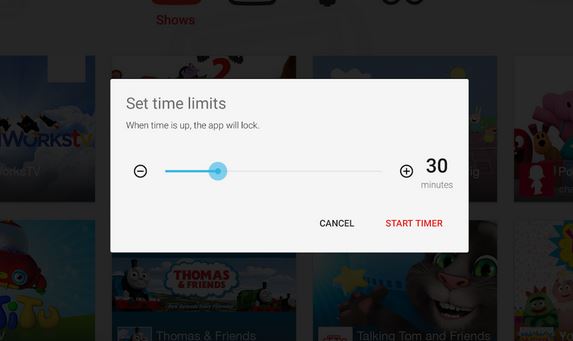
- Timer: You can set the timer to limit the screen time. It will alert your child when the session is over, and then automatically turn off.
- Sound settings: You can turn off background music and sound according to your need.
- Search settings: You can also limit the search on YouTube Kids.
- Product feedback: You can also give feedback of the product in YouTube Kids in order to improve the quality of the app.
0 comments:
Post a Comment